Egress control
See every connection your apps make
Egron shows which app is talking to which server. Allow or block each connection with a rule you can read.
How it works
The Gate
Every outgoing connection passes through Egron. Your rules decide which ones continue, which wait for your answer and which stop.
Fig. III
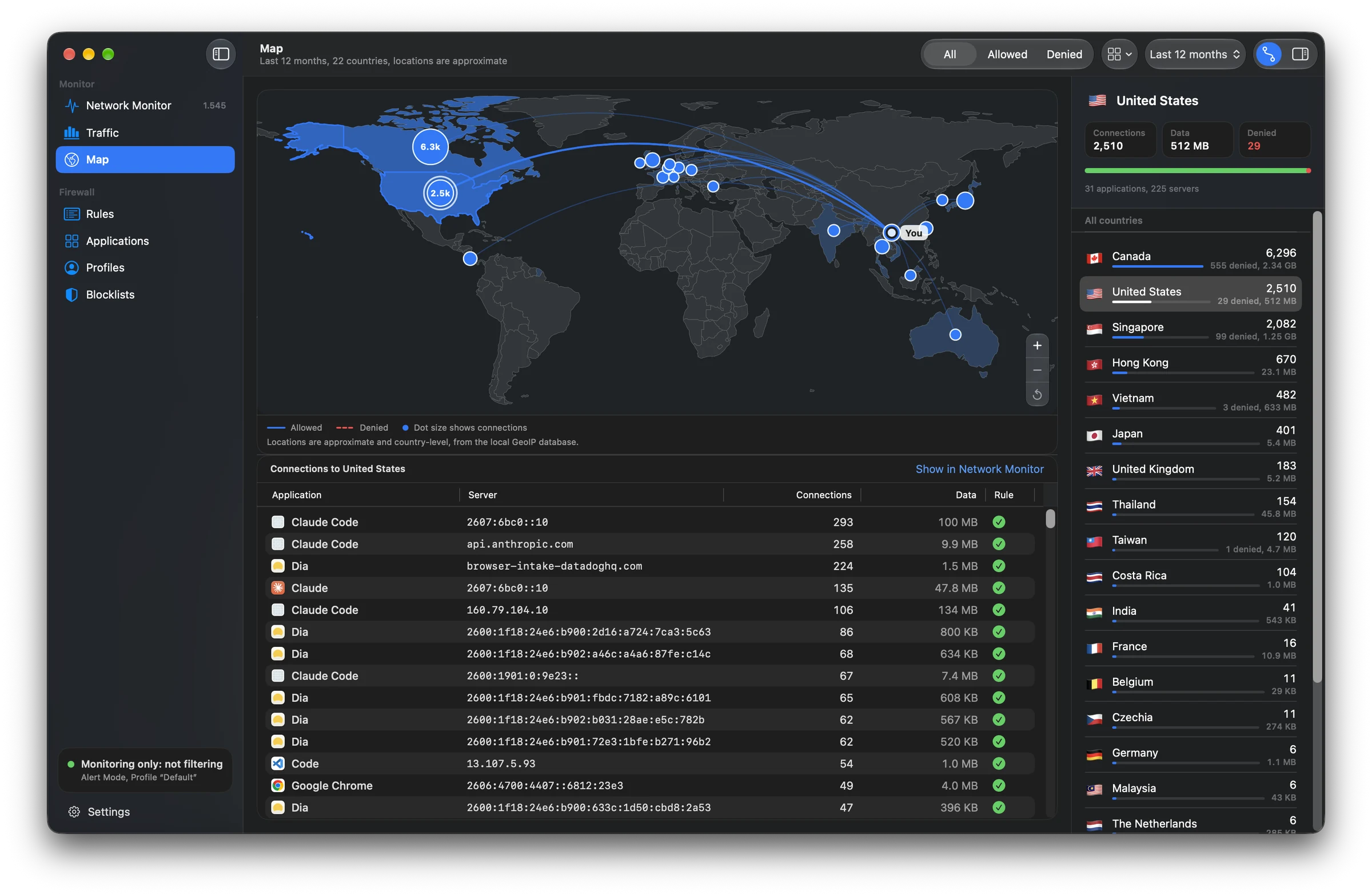
The Map
Where your connections went, country by country. Locations are looked up on your device, never online.
Get Egron
No account and no server. Your rules and history stay on your device.
Download
A native Swift app that filters with Apple’s Network Extension.
Download .dmgFeatures
Network Monitor
A live table of every connection, grouped by app or by server, with location, port, and what was sent and received. Look back 5 minutes or 12 months.
Connection Alerts
In Alert mode, a connection no rule covers waits for your answer. Allow or deny it for one server, the domain, or any server, until the app quits or forever.
Rules
Match by app, app group, host, domain, IP range, port, protocol, direction and interface. Every rule reads as a sentence, like Allow Slack → any server in slack.com.
Tidy Up
Finds rules that are redundant, never match, or point at apps you removed.
Blocklists
Import plain text lists of domains, addresses and ranges. Keep the entries you need with exceptions.
Profiles
Choose which rule groups and blocklists apply, and switch automatically when you join a network.
Map and Traffic
See where data goes, country by country, and how much each app sends and receives over time.
Menu Bar
The live rate, recent denials, the filter switch, the mode and the profile, without opening the app.
When several rules match
Rule Order
Specificity
A rule for one server beats a rule for its domain.
Ask Slack → files.slack.com
Source
When two are equally specific, your rule beats a blocklist.
Allow any app → cdn.example.com
Action
If they still tie, the stricter action wins.
Deny → Ask → Allow
Questions
Does Egron send my data anywhere?
No. There is no account and no server. Your rules, history and settings stay on your device.
How is it different from a built-in firewall?
Built-in firewalls, like the one in macOS, control what comes in. Egron watches and controls what your apps send out, per app and per server.
Why does it say Monitoring only?
Until you approve its network extension, Egron can record connections but not block them. The status reads Filter active once your rules are being enforced.
What happens when two rules match?
The most specific rule wins. If two are equally specific, your own rule beats a blocklist. If they still tie, Deny beats Ask, and Ask beats Allow.
Do I have to answer alerts all day?
No. Alert is one of three modes. Silent Allow lets unmatched connections through and logs them, Silent Deny blocks and logs them. Review either later in Network Monitor.
What does it run on?
Egron runs on macOS 26 or later.